

Invoices
Upload documents into structured records
InvoiceHive imports amounts, dates, parties, and line details when the file allows, so the team reviews instead of retyping.
AI-native · invoices · bank · reconcile
InvoiceHive extracts uploads, surfaces anomaly flags, and keeps payables, receivables, and bank lines in one reconciliation workflow. Your team reviews what matters instead of retyping documents or hunting through exports.
Free tier · Plans from $19/mo · No card required
Founding customers
We are onboarding the first 3 to 5 companies with hands-on setup.
If your team still reconciles invoice files and bank activity manually, we will help you complete setup, upload your first files, and reach your first reconciliation quickly.
Hard to see invoices to pay vs. to receive, total owed vs. owing, and what’s overdue.
Bank activity lives in PDFs and exports — not next to the invoices it belongs to.
Chasing line-by-line ties between statements and invoices burns time and invites errors.
Clients and providers scattered across files make every link a mini project.
Duplicates, mismatches, and suspicious patterns are easy to miss until someone spots them manually—after time and trust are already on the line.
Upload once — AI-assisted extraction and anomaly detectors run on your data so review, triage, and reconciliation happen in one product.
Add invoice PDFs or supported files. InvoiceHive automatically imports the fields it can read — totals, dates, vendors and customers, line items where available — so data lands in the app without manual entry. You verify and adjust before it drives your workflow.
Import CSV or PDF statements; line-level activity is extracted into the workspace (complete a short org profile when the product asks).
Open the anomalies workspace for admins: filter by category and severity, read evidence on each flag, then acknowledge, resolve, dismiss as a false positive, or escalate. Match bank lines to invoices with auto-match where it helps, then handle edge cases.
Keep clients and providers in sync and invite your team with the right access.
The same modules you see in the product — framed for buyers and operators, including AI-driven import and anomaly detection.
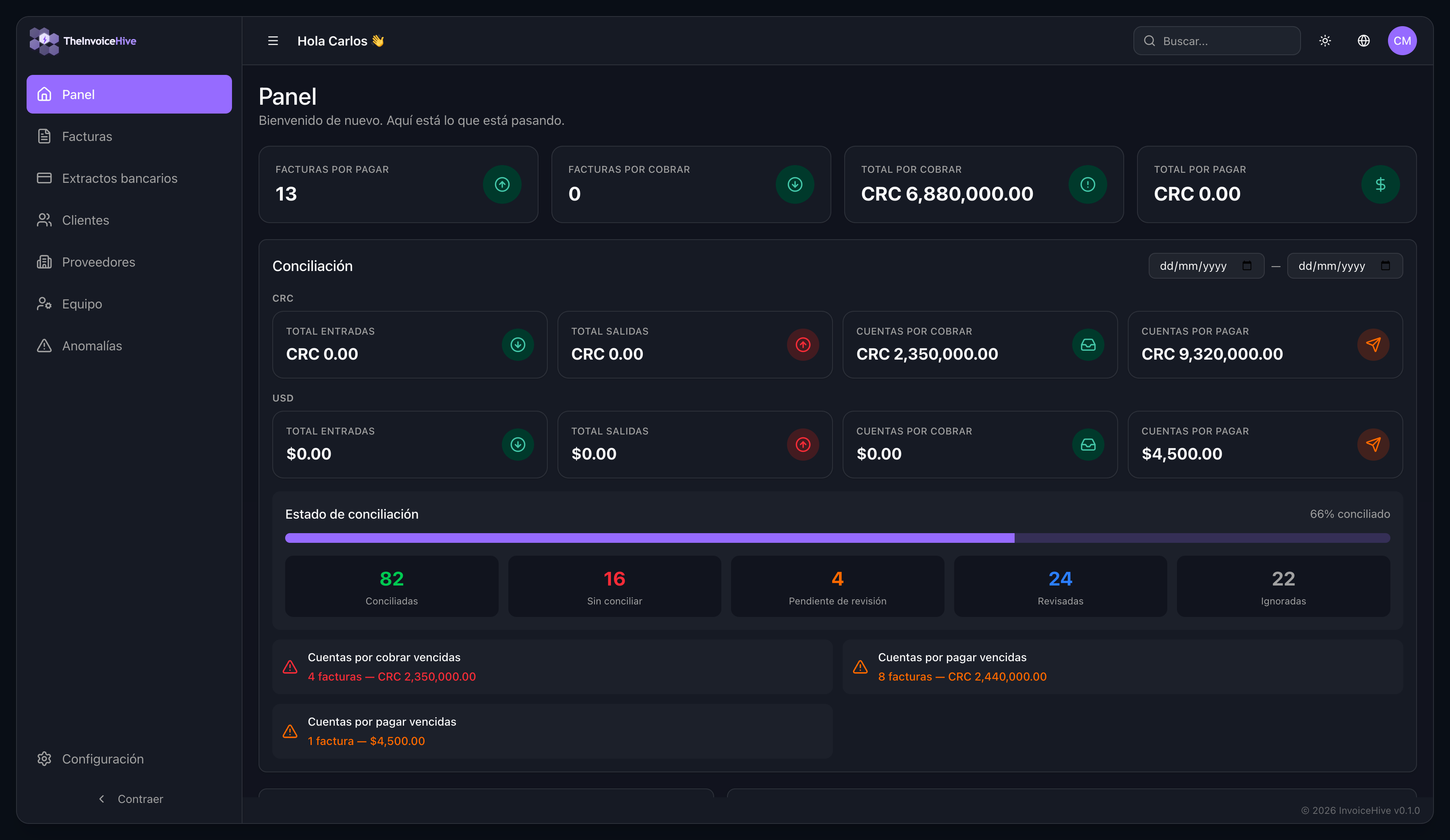
One place for cash position, breakdown, and what needs attention.
Upload in the app or send invoices to a dedicated inbound email address as attachments — InvoiceHive imports the data automatically into structured records — amounts, parties, dates, line items, and regional fields when supported — then you organize status and links from there.
AI-backed detectors raise flags with severity, category (invoice, payment matching, vendor, timing, bank statement, document integrity, portfolio, and more), and classification—then your team triages with acknowledge, resolve, dismiss, or escalate. Summaries and optional threshold tuning help admins stay ahead of noise.
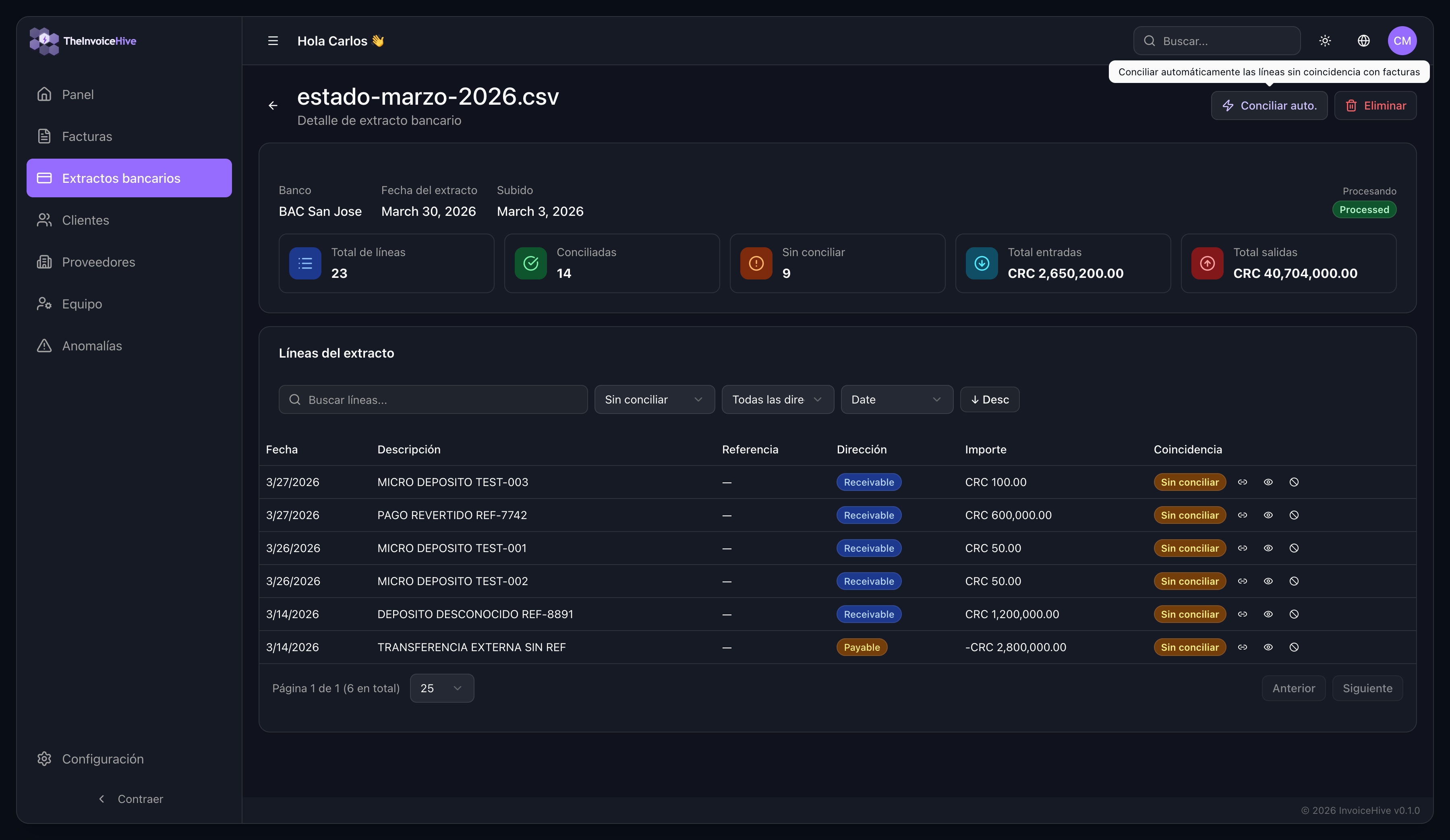
Upload CSV or PDF statements and InvoiceHive imports line-level activity into one workspace — directions, amounts, and processing state — ready to match against invoices.
Matched, unmatched, pending review, ignored — progress you can trust.
Directory linked to invoices so relationships stay consistent.
Vendors and suppliers ready to tie to payables.
Roles for growing orgs — invite who needs in, gate what they see.
Subscription tiers with limits and optional overage — details in the app.
Uploads become structured records, anomaly flags appear when detectors fire, and reconciliation stays next to the underlying invoices and statements. The point is not storage. The point is faster review and clearer action.
Invoices
InvoiceHive imports amounts, dates, parties, and line details when the file allows, so the team reviews instead of retyping.
Statements
CSV and PDF statements become line-level activity in the same workspace, ready for matching and review.
Review
Matched, unmatched, pending review, ignored: the app shows what needs action instead of burying it in exports.
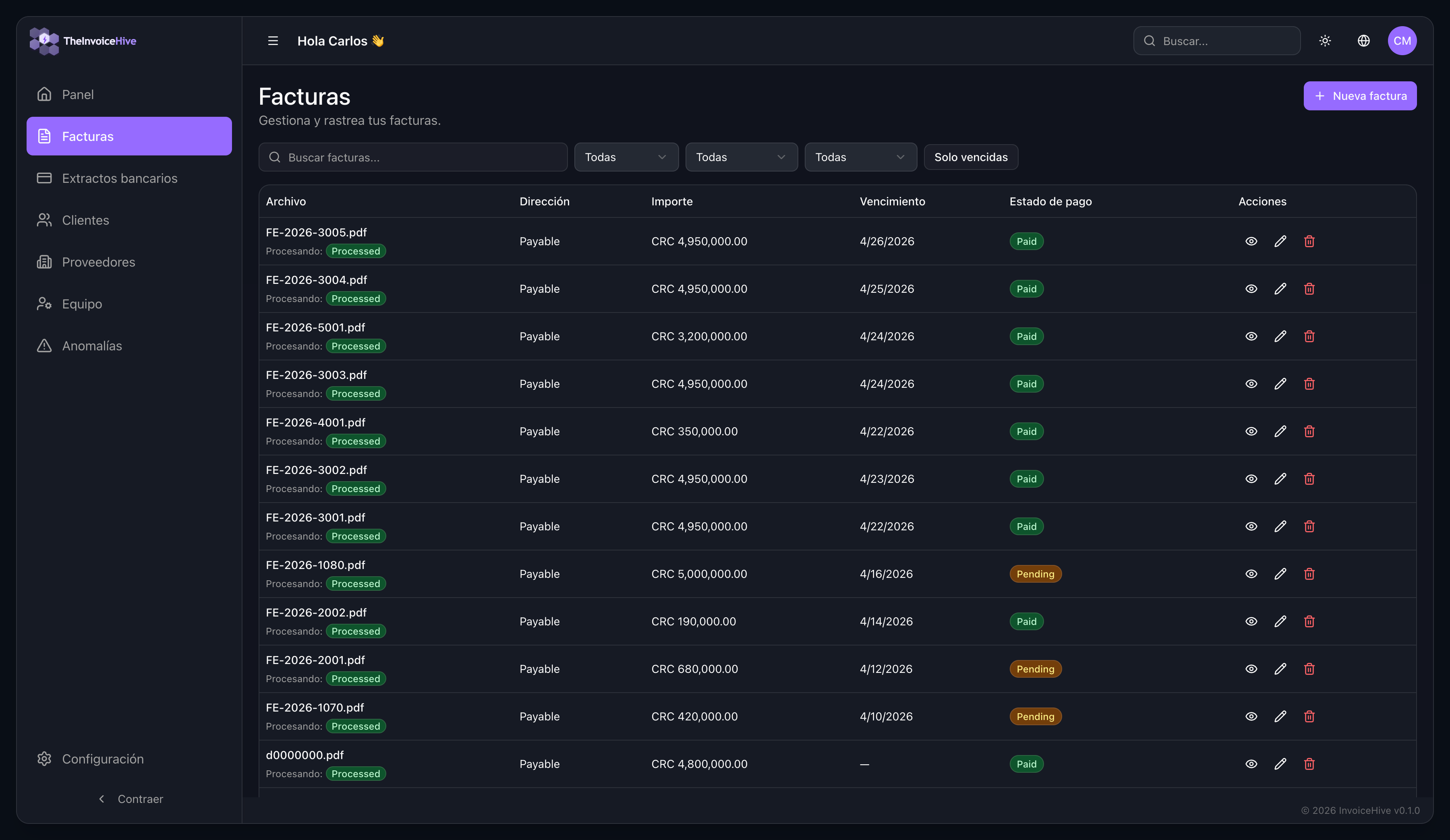
Invoice list with real operating context
Use this to prove the product is already handling uploaded invoice records, statuses, and daily review work.
Line-by-line bank statement review
This is the strongest proof screen for the campaign because it shows the matching workflow, not just data storage.
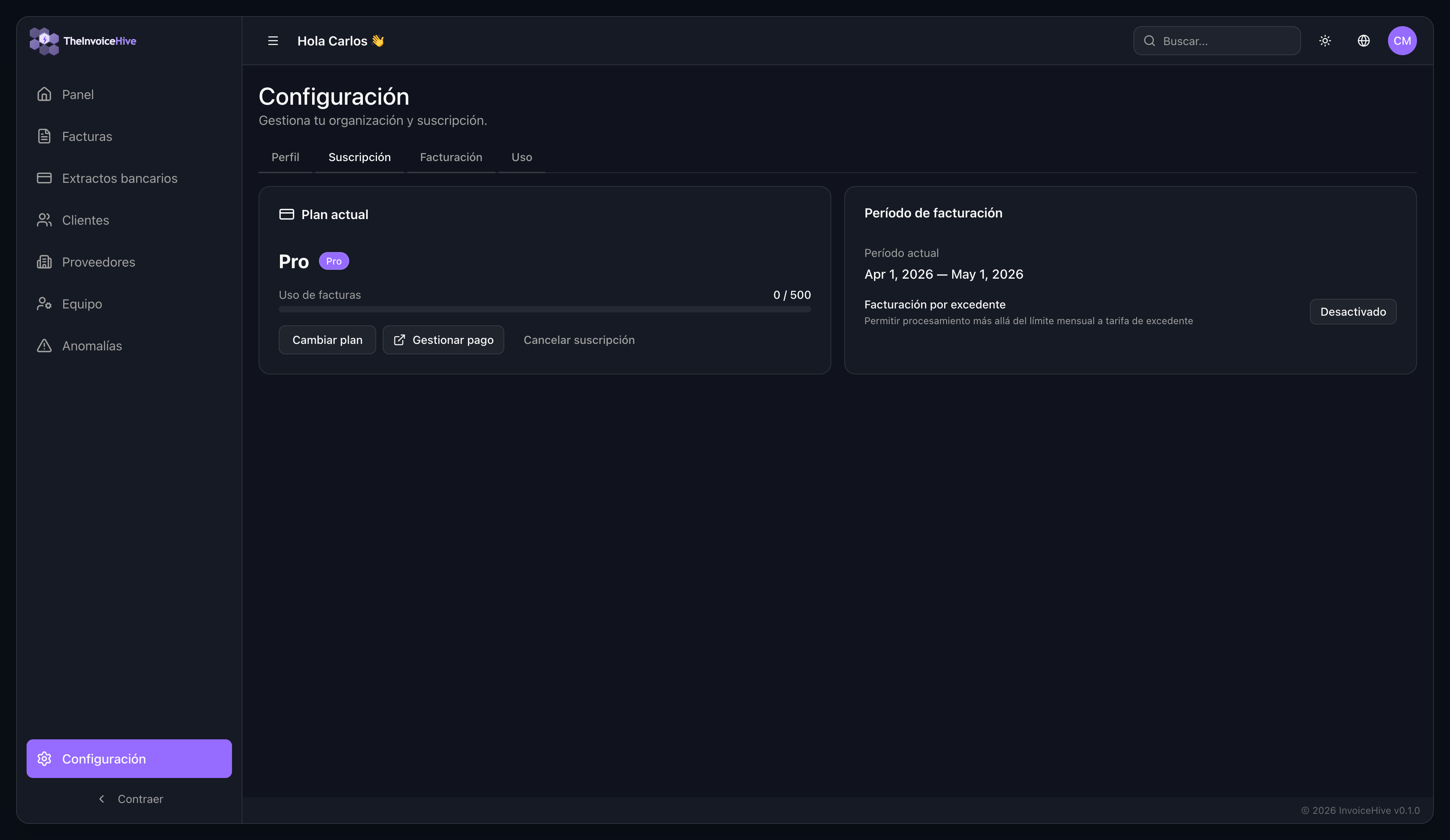
Clear plan and usage controls
The app already exposes plan, billing period, and usage information, which helps support pricing conversations.
See total income and outcome, outstanding receivables and payables, and a matching status you can filter by period — the same language your team already uses in InvoiceHive.
At a glance
Sample viewTotal income
CRC 2,650,200.00
Total outcome
CRC 40,704,000.00
Outstanding receivables
CRC 2,350,000.00
Outstanding payables
CRC 9,320,000.00
InvoiceHive posts every reconciled invoice and bank match into a built-in double-entry ledger, then produces the statements your accountant and the tax authority expect — no separate books to keep.
Sample statement
Balance SheetAs of Jun 30, 2026 · CRC
Assets = Liabilities + Equity
For accounting firms
Bookkeepers and accounting firms manage many clients from a single workspace — one plan, one bill, shared across every client, without compromising data isolation or client autonomy.
Your firm holds one plan; its monthly invoice quota is pooled across all client tenants. Clients keep their own isolated data and revocable access.
Monthly invoice limits, transparent USD pricing, and optional overage on paid plans. Accounting firms use one plan whose quota is pooled across all client workspaces.
$19/mo
Up to 200 invoices/mo
For small businesses with steady invoice volume
$0.25 per extra invoice
Get startedPopular
$49/mo
Up to 1000 invoices/mo
For growing businesses with higher invoice volumes
$0.15 per extra invoice
Get started$99/mo
Up to 5000 invoices/mo
For large businesses with high-volume invoice processing
$0.08 per extra invoice
Get startedQuestions about plans, security, or a pilot? Send a note — we’ll follow up.
No. When you upload invoice PDFs or other supported documents, InvoiceHive automatically imports the data it can detect — such as amounts, dates, parties, and line items — into structured records. You review and correct as needed; supported formats and field coverage are shown in the app.
The product accepts CSV and PDF uploads for bank statements (see in-app upload for size limits).
You can match statement lines to invoices manually or use auto-match when the system can propose a confident link. You still control review, ignore, and confirm actions.
As data is ingested, detectors can raise anomaly flags—for example on invoices, payment matching, vendors, timing, bank statements, document integrity, and portfolio-level patterns. Each flag includes context and evidence. Tenant admins can review a summary, filter the list, act on individual flags (acknowledge, resolve, dismiss as false positive, or escalate), bulk-dismiss where appropriate, and adjust detector thresholds when settings allow.
Teams that handle both sides of the ledger — payables and receivables — and want invoices and bank activity in one reconciliation workflow.
Plans include monthly invoice limits, with optional overage on paid plans. Accounting firms choose one plan and its quota is pooled across every client workspace, billed to the firm as a single subscription. Check Subscription and Billing in the app for your organization’s numbers.
The product supports English and Spanish. This site is available in both languages.
InvoiceHive stores uploaded invoice and bank-statement data so your team can review, reconcile, and investigate anomalies inside one workspace. If you want details about the current setup, access model, or data handling approach, contact us and we will walk you through it.
Create a workspace now, or contact us if you want hands-on help with setup, uploads, and your first real review flow.
Setup in 2 minutes — or talk to us first
Why early teams are talking to us
A focused workflow for invoice + bank statement reconciliation, with hands-on onboarding for early customers.
We are not trying to look bigger than we are. We are making the first version useful, fast to understand, and easy to test with a real team.
Workflow
Built around reconciliation, not just invoice storage
The product already covers invoices, bank statements, matching states, and reconciliation summaries in one flow.
Launch
Self-serve signup with founder-led help
New teams can register on their own, or contact us for a guided setup to reach first value faster.
Language
English and Spanish ready
The public site and the product both support English and Spanish, which matters for Costa Rica and broader regional teams.
Pilot
Early access with direct feedback loop
Founding customers get faster support, closer product feedback, and a shorter path from trial to useful workflow.